네이버 지도 API를 연동하고, 마커와 폴리라인을 표시해봅시다~
우선 네이버 클라우드 플랫폼에서 애플리케이션을 등록하고, Maps API를 활성화 해야 한다.
그리고 클라이언트 ID를 발급받아서 환경 변수에 저장해놓기!
NAVER CLOUD PLATFORM
cloud computing services for corporations, IaaS, PaaS, SaaS, with Global region and Security Technology Certification
www.ncloud.com

Dynamic Map을 선택하면 된다. (Geocoding은 주소를 좌표로 변환할 때 사용했슴)
기본 구조
Next.js에서 외부 JS SDK를 불러올 때는 next/script 컴포넌트를 사용한다.
네이버 지도 API는 SDK 스크립트를 로드한 뒤 전역 객체(window.naver)를 통해 접근한다고 한다.
// naverMap.types.ts

import { TagVariant } from "../common/tag/tag.types";

export interface MarkerData {
  lat: number;
  lng: number;
  emotion: TagVariant;
}

export interface NaverMapOptions {
  center?: naver.maps.LatLng;
  zoom?: number;
  draggable?: boolean;
  pinchZoom?: boolean;
  scrollWheel?: boolean;
  keyboardShortcuts?: boolean | Record<string, boolean>;
  disableDoubleClickZoom?: boolean;
}

export interface NaverMapProps {
  markers: MarkerData[];
  zoom?: number;
  height?: string;
  onMarkerClick?: (marker: MarkerData) => void;
  options?: NaverMapOptions;
  polyline?: [number, number][]; // lat, lng 좌표 배열
}

// 감정별 마커 이미지
export const emotionImages: Record<TagVariant, string> = {
  "가족 🏠": "/images/marker/yellow-marker.svg",
  "우정 🤝": "/images/marker/blue-marker.svg",
  "위로/치유 🌱": "/images/marker/green-marker.svg",
  "외로움 🌙": "/images/marker/purple-marker.svg",
  "설렘/사랑 💌": "/images/marker/pink-marker.svg",
  "향수 🌿": "/images/marker/red-marker.svg",
  "기쁨/신남 🎉": "/images/marker/mint-marker.svg",
  "화남/분노 😡": "/images/marker/brown-marker.svg",
  기본: "/images/marker/black-marker.svg",
};
"use client";
import { useEffect, useRef } from "react";
import Script from "next/script";
import { emotionImages, NaverMapProps } from "./naverMap.types";
interface LatLngArray extends Array<number> {
0: number;
1: number;
}
const NaverMap = ({
markers,
zoom = 10,
height,
onMarkerClick,
options,
center,
polyline,
}: NaverMapProps & {
center?: { lat: number; lng: number };
polyline?: LatLngArray[];
}) => {
const mapRef = useRef<HTMLDivElement>(null);
const markerRefs = useRef<naver.maps.Marker[]>([]);
const mapInstance = useRef<naver.maps.Map | null>(null);
const polylineInstance = useRef<naver.maps.Polyline | null>(null);
// 지도 초기화
const initMap = () => {
if (!window.naver || !mapRef.current) return;
const mapCenter = center
? new window.naver.maps.LatLng(center.lat, center.lng)
: markers.length
? new window.naver.maps.LatLng(markers[0].lat, markers[0].lng)
: new window.naver.maps.LatLng(37.6163, 127.0161); // 기본 위치
mapInstance.current = new window.naver.maps.Map(mapRef.current, {
center: mapCenter,
zoom,
...options,
});
renderMarkers();
};
// 마커 + 폴리라인 렌더링
const renderMarkers = () => {
if (!mapInstance.current) return;
// 기존 마커 제거
markerRefs.current.forEach((m) => m.setMap(null));
markerRefs.current = [];
// 기존 폴리라인 제거
polylineInstance.current?.setMap(null);
polylineInstance.current = null;
// 마커 추가
markers.forEach((markerData) => {
const { lat, lng, emotion } = markerData;
const position = new window.naver.maps.LatLng(lat, lng);
const marker = new window.naver.maps.Marker({
position,
map: mapInstance.current,
icon: {
url: emotionImages[emotion] || emotionImages["기본"],
size: new window.naver.maps.Size(40, 40),
anchor: new window.naver.maps.Point(20, 40),
},
});
if (onMarkerClick) {
window.naver.maps.Event.addListener(marker, "click", () =>
onMarkerClick(markerData)
);
}
markerRefs.current.push(marker);
});
// polyline 추가
if (polyline && polyline.length >= 2) {
const linePath = polyline.map(
([lat, lng]) => new window.naver.maps.LatLng(lat, lng)
);
polylineInstance.current = new window.naver.maps.Polyline({
map: mapInstance.current,
path: linePath,
strokeColor: "#6FCF97",
strokeWeight: 4,
strokeOpacity: 0.8,
});
}
};
// props 변경 시 마커/라인 다시 그림
useEffect(() => {
if (mapInstance.current) renderMarkers();
else if (window.naver) initMap();
}, [markers, zoom, options, polyline]);
// center 변경 시 지도 이동
useEffect(() => {
if (mapInstance.current && center) {
mapInstance.current.setCenter(
new window.naver.maps.LatLng(center.lat, center.lng)
);
mapInstance.current.setZoom(zoom);
}
}, [center, zoom]);
return (
<>
<Script
src={`https://openapi.map.naver.com/openapi/v3/maps.js?ncpKeyId=${process.env.NEXT_PUBLIC_NAVER_CLIENT_ID}&submodules=geocoder`}
strategy="afterInteractive"
onLoad={initMap}
/>
<div
ref={mapRef}
className="z-0 flex-1 w-full overflow-hidden border rounded-3xl border-main-green"
style={{ height }}
/>
</>
);
};
export default NaverMap;
내가 사용했던 NaverMap 컴포넌트.
주요 특징
스크립트 로드
- next/script로 네이버 지도 SDK를 비동기로 불러옴
- strategy="afterInteractive": 페이지 로딩 이후 실행
지도 초기화
- new naver.maps.Map()으로 지도 인스턴스 생성
- 중심 좌표(center), 줌(zoom) 옵션 적용 가능
마커 추가
- new naver.maps.Marker()를 사용
- emotionImages로 아이콘 커스터마이징
이벤트 바인딩
- naver.maps.Event.addListener(marker, "click", callback)으로 마커 클릭 이벤트 처리
폴리라인(Polyline) 추가
- new naver.maps.Polyline()으로 선 경로 표시 가능
리렌더링 관리
- useEffect에서 props(markers, center, zoom, polyline) 변경 시 지도 갱신
이렇게 하고
<NaverMap
  height="500px"
  zoom={12}
  markers={[
    { lat: 37.5665, lng: 126.9780, emotion: "기쁨" },
    { lat: 37.5700, lng: 126.9820, emotion: "슬픔" },
  ]}
  polyline={[
    [37.5665, 126.9780],
    [37.5700, 126.9820],
  ]}
  onMarkerClick={(marker) => console.log("클릭:", marker)}
/>
이런 식으로 사용하면 된다!
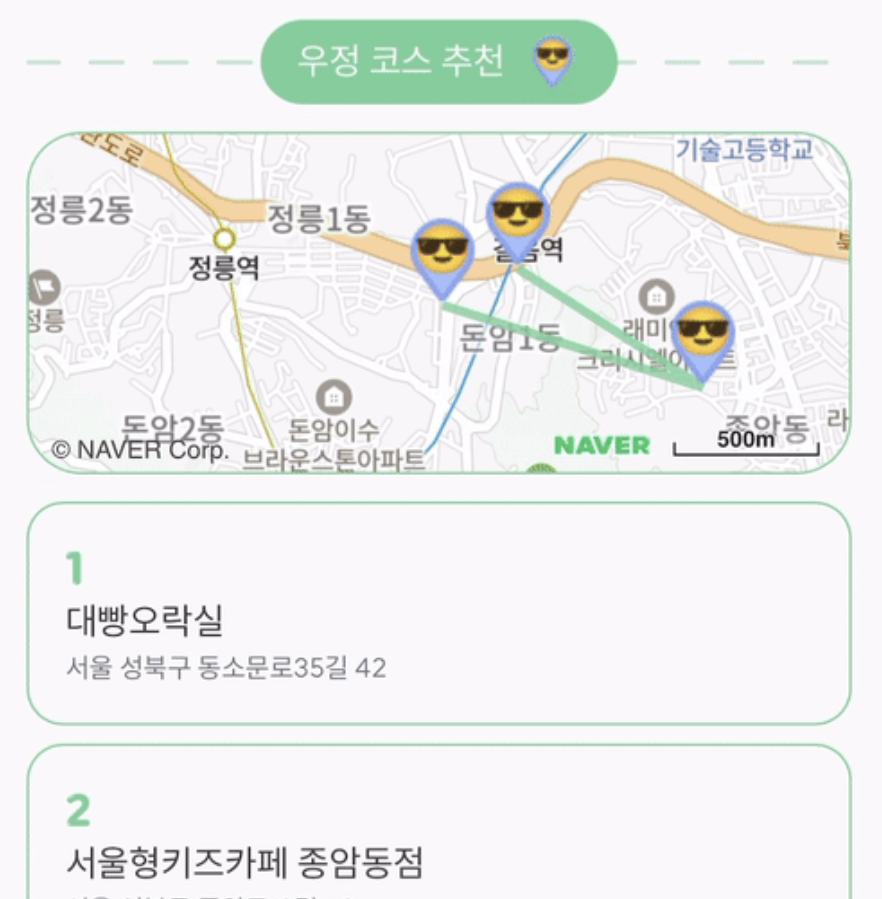
다름이 아니라 저 네이버 지도 API SDK 주소 때문에 좀 애먹었는데,
지피띠니랑 같이 하니까 얘도 주소를 제대로 몰랐다.
공식 문서에서 제공하는 SDK 주소 (openapi랑 oapi 둘 다 같은 네이버맵 API 서버를 가리킨다고 합니다)
↓↓↓↓
https://openapi.map.naver.com/openapi/v3/maps.js?ncpKeyId=${process.env.NEXT_PUBLIC_NAVER_CLIENT_ID}&submodules=geocoderNAVER Maps API v3
NAVER Maps API v3로 여러분의 지도를 만들어 보세요. 유용한 기술문서와 다양한 예제 코드를 제공합니다.
navermaps.github.io
그리고 아이콘 커스터마이징이 진짜 안 됐는데, 이유는 모르겠으나 이미지 크기 자체를 40px로 맞춰주니까 그제서야 됐다.


'개발 > Next.js' 카테고리의 다른 글
| Next.js에서 GA 연동하기 (3) | 2025.09.17 |
|---|---|
| Next.js에서 네이버맵 검색하고 마커 띄우기 (0) | 2025.09.07 |
| Next.js + Storybook 연동 기록 (10) | 2025.08.15 |
| Next.js의 렌더링 방식 (CSR/SSR/SSG/ISR) (4) | 2025.08.07 |
| [Next.js] 미들웨어 (1) | 2025.08.07 |